Mastering Your Wine Cellar: A Complete Guide
Your wine cellar is more than just a list of bottles – it's your personal wine journey, captured and organized. CorkAI's Cellar feature transforms how you interact with your collection, providing instant insights, personalized ratings, and a comprehensive history of every wine you've enjoyed.
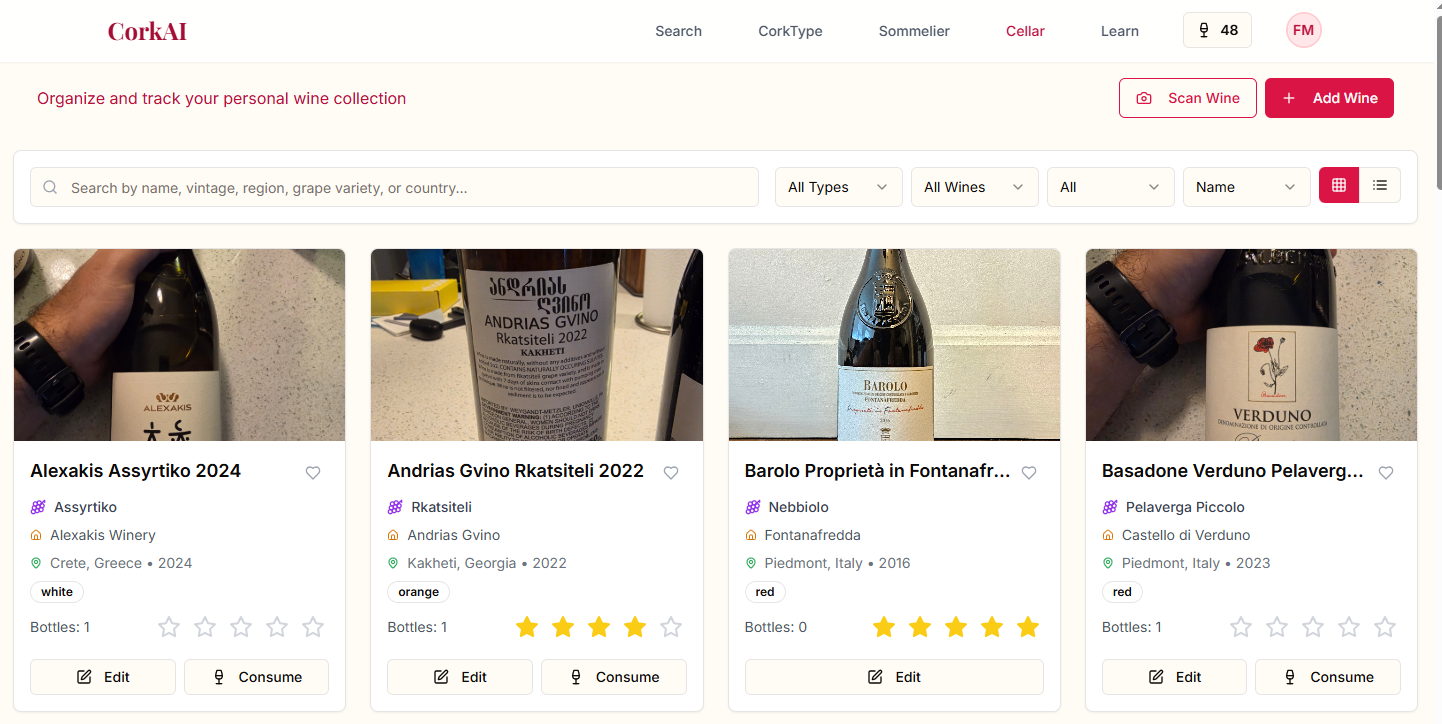
Getting Started: Two Ways to Add Wines
1. Scan Wine Labels for Instant Recognition
The fastest way to add wines to your cellar is by scanning their labels. This powerful feature does more than just identify the wine – it provides an instant match score showing how well the wine aligns with your personal taste profile.
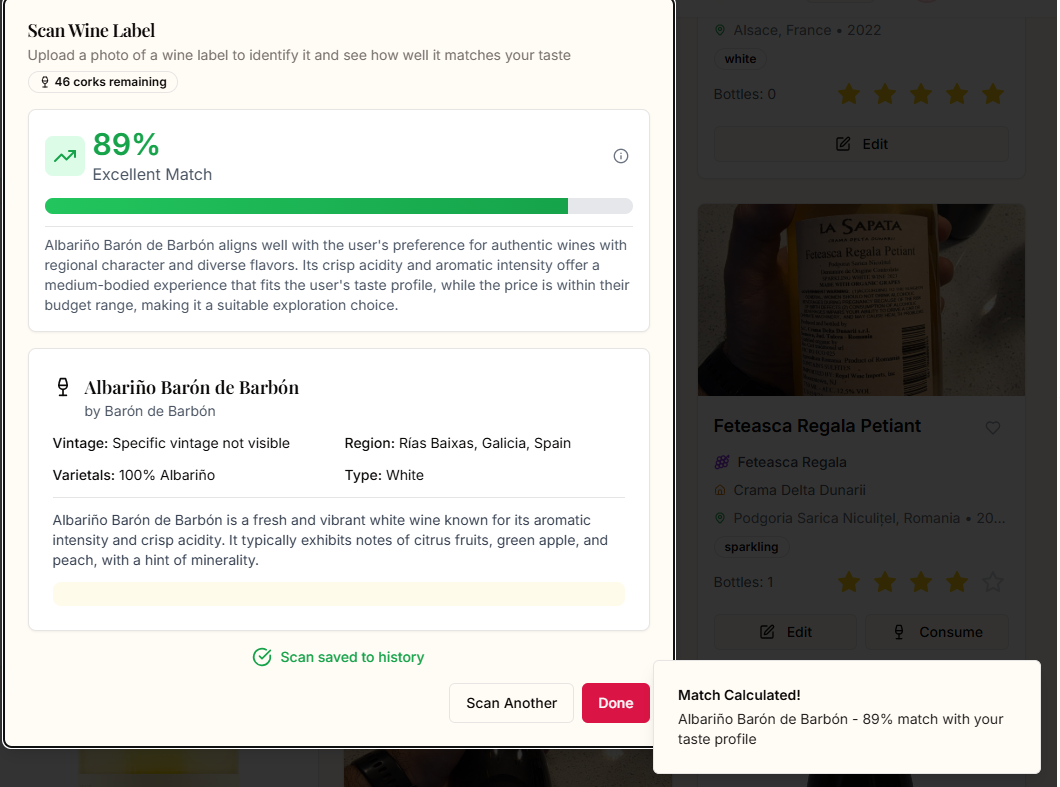
How it works:
1. Click the "Scan Wine" button in your cellar
2. Point your camera at the wine label
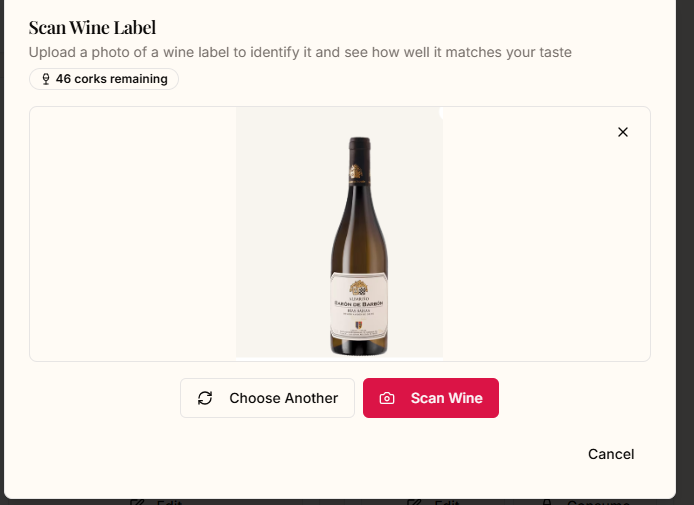
3. CorkAI instantly recognizes the wine and provides:
- Complete wine details (producer, vintage, region, varietals)
- Your personalized match percentage (e.g., "89% Excellent Match")
- Detailed explanation of why this wine suits your taste
- Option to save to your scan history or add directly to your cellar
Pro Tip: Use this feature when shopping at wine stores! Simply scan any bottle to instantly see if it matches your taste preferences. No more guessing – know before you buy whether a wine is right for you.
2. Manual Entry with Smart Autofill
For wines not in our database or when you want to add specific details, use the manual entry form. The form intelligently autofills information as you type, making data entry quick and accurate.
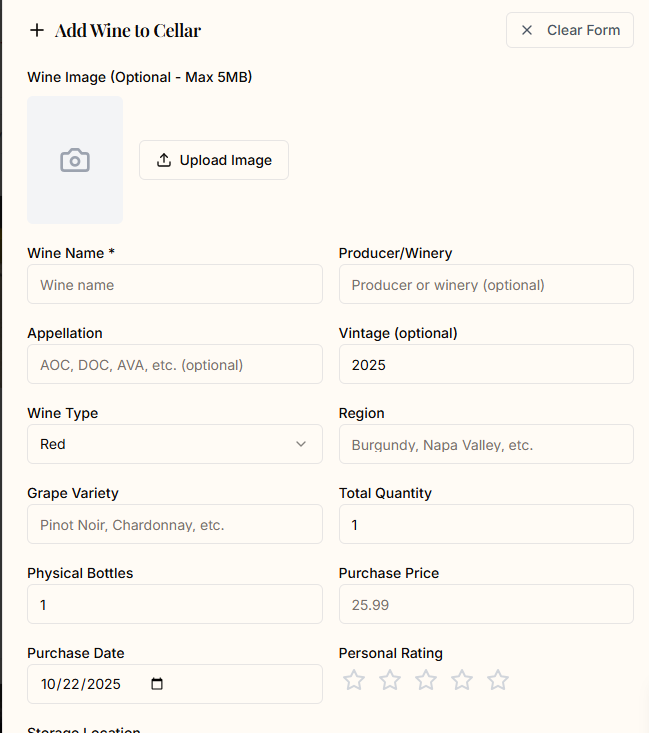
Key fields include:
- Wine Name & Producer: Required fields for basic identification
- Appellation: Add specific AOC, DOC, AVA designations
- Vintage & Region: Track years and origins
- Grape Variety: Document the varietals
- Bottles Owned: Track your actual inventory (wines with 0 bottles won't appear in recommendations)
- Purchase Price & Date: Monitor your investment
- Personal Rating: Rate wines on a 5-star scale
- Storage Location: Remember where you've stored each bottle
- Drinking Window: Set optimal drinking dates
- Wine Status: Mark as aging, ready, or past prime
Managing Your Collection
Edit Wine Details
Every wine in your cellar can be edited at any time. Simply click the "Edit" button on any wine card to update details, adjust inventory, or add tasting notes.
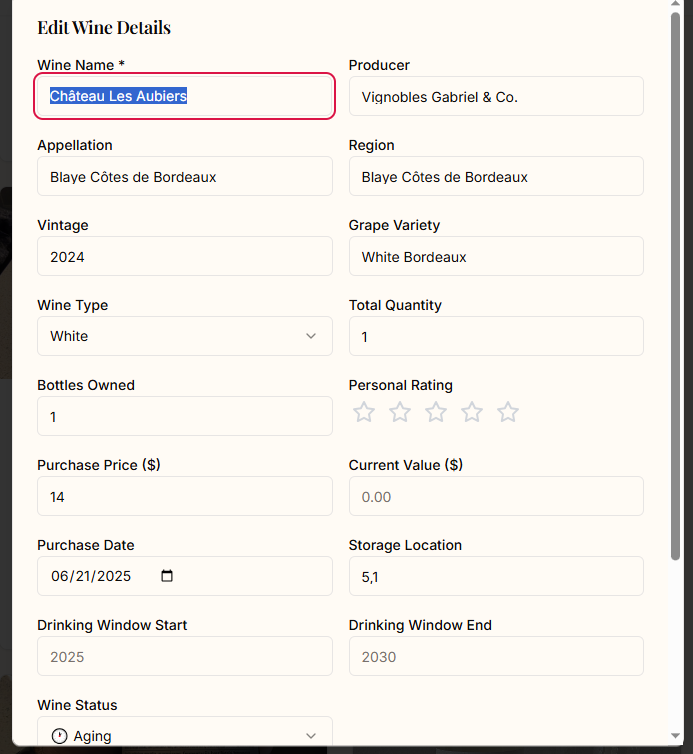
The edit form shows all your wine's details, allowing you to:
- Update quantities as you consume bottles
- Add or modify tasting notes
- Adjust ratings based on new tastings
- Update storage locations
- Set drinking windows
The Power of Ratings: Training Your Personal Sommelier
Every wine you rate helps CorkAI learn your preferences better. The more wines you add and rate, the more accurate your personalized recommendations become. This creates a virtuous cycle:
1. Rate wines → CorkAI learns your preferences
2. Get better recommendations → Discover wines you'll love
3. Rate new discoveries → Further refine your profile
Your ratings influence:
- Match percentages when scanning new wines
- Wine pairing suggestions for meals
- Discovery recommendations in the search feature
- Your evolving taste profile over time
Tracking Your Wine Journey
Consumption History
Keep a detailed record of every wine you've enjoyed. The consumption history feature tracks:
- When you drank each wine
- Your rating and tasting notes
- Special occasions or meal pairings
- Evolution of your taste preferences
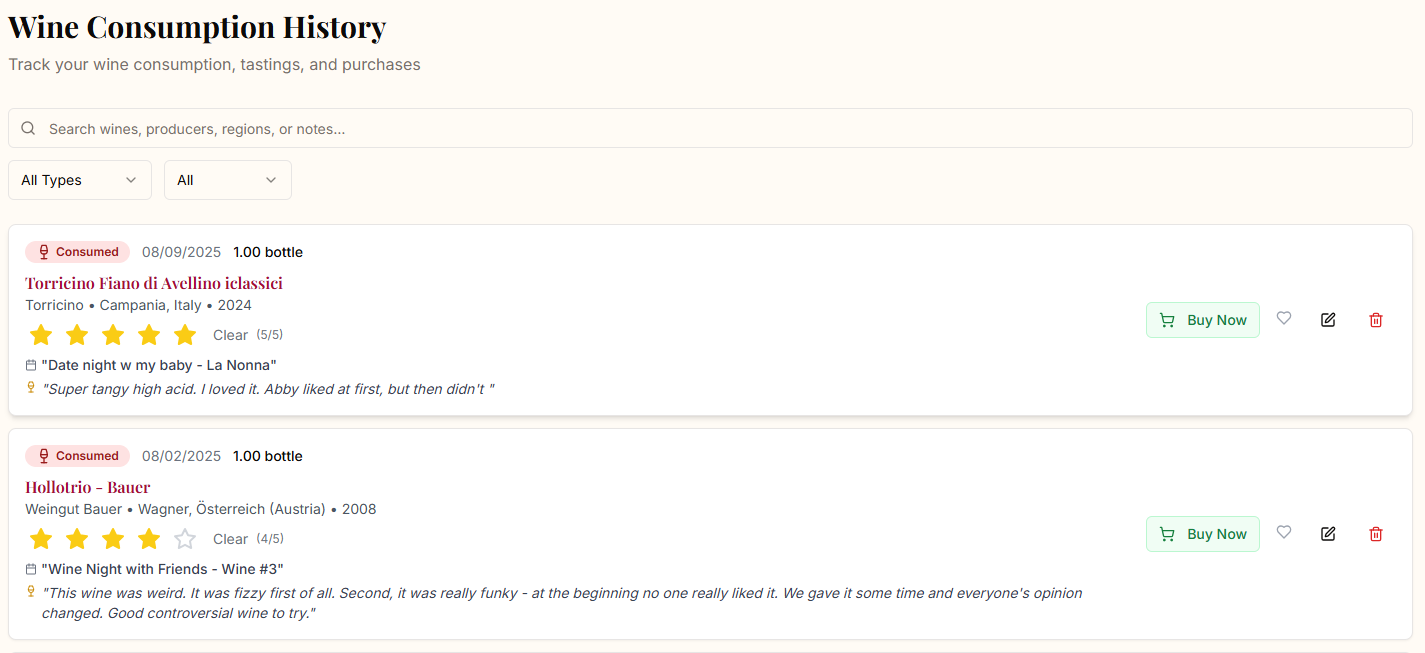
Each entry in your consumption history includes:
- Date consumed
- Number of bottles opened
- Your rating (1-5 stars)
- Detailed tasting notes
- Context (e.g., "Date night w my baby - La Nonna", "Wine Night with Friends")
Scan History
Every wine you scan is saved, creating a valuable reference library. This is perfect for:
- Remembering wines you considered but didn't buy
- Comparing similar wines
- Building a wishlist of future purchases
- Tracking your wine exploration journey
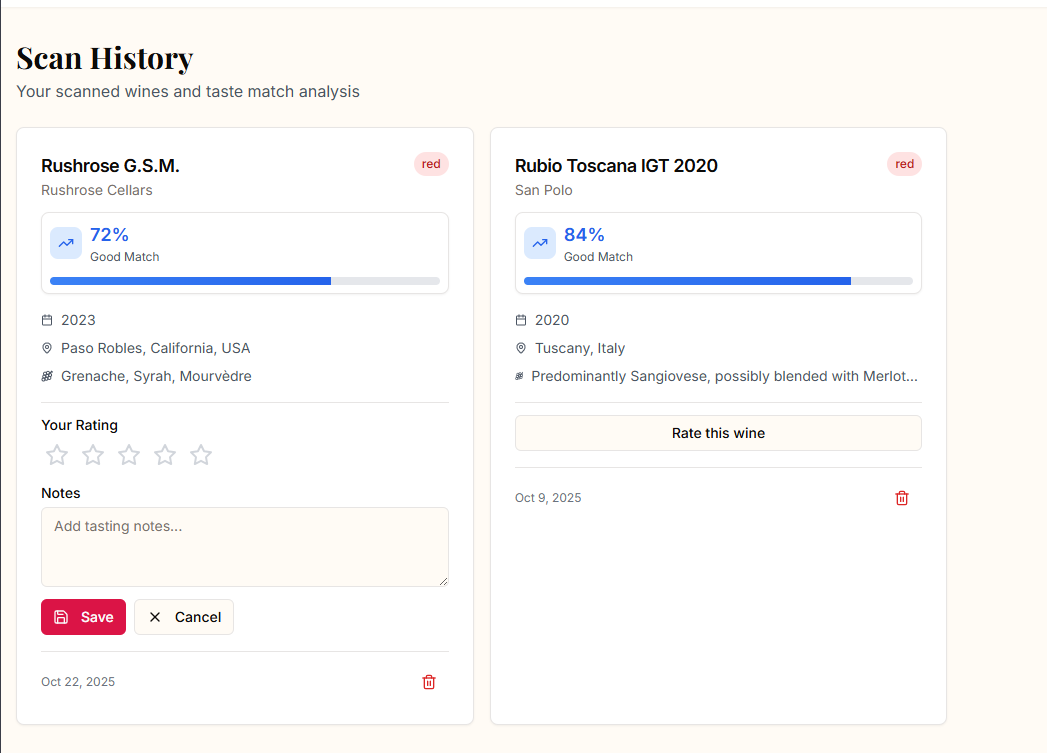
Your scan history shows:
- Match percentage for each wine
- When you scanned it
- Complete wine details
- Option to add notes
- Quick add to cellar button
Advanced Features
Smart Inventory Management
CorkAI distinguishes between:
- Bottles Owned: Physical bottles in your possession
- Total Quantity: Historical tracking including consumed bottles
- Wishlist Items: Wines with 0 bottles owned
Important: Only wines with bottles owned (quantity > 0) will appear in pairing recommendations and cellar searches. This ensures recommendations are practical and actionable.
Integration with Other Features
Your cellar data enhances every part of CorkAI:
- Pairing Recommendations: When enabled, prioritizes wines from your cellar
- Sommelier Chat: References your collection for personalized advice
- Search Results: Shows which recommended wines you already own
- Profile Evolution: Continuously updates based on your ratings
Wine Status Tracking
Mark wines with their current drinking status:
- Aging: Still developing, save for later
- Ready: At peak drinking window
- Past Prime: Drink soon before decline
- No Status: General collection items
Best Practices
1. Scan First, Edit Later When adding multiple wines, scan them all first for quick addition, then go back to add specific details like storage location and purchase price.
2. Regular Inventory Updates Update bottle counts as you consume wines. This keeps recommendations relevant and helps track consumption patterns.
3. Consistent Rating Develop your own rating system and stick to it. Whether you use: - 5 stars for exceptional, once-a-year wines - 4 stars for excellent dinner wines - 3 stars for good everyday wines - 2 stars for disappointing bottles - 1 star for wines you won't buy again
4. Use Tasting Notes Even brief notes help you remember wines: "Great with pasta", "Too tannic", "Perfect for summer". These notes are searchable and invaluable for future reference.
5. Leverage Scan History as a Shopping List When visiting wine stores, review your scan history for highly-rated wines you haven't purchased yet.
The Mobile Advantage
CorkAI's cellar features are fully mobile-optimized, making them perfect for:
- Wine shopping: Scan bottles in stores for instant ratings
- Restaurant visits: Check if wines on the menu match your taste
- Cellar organization: Update inventory while organizing your physical cellar
- Tasting events: Rate and note wines in real-time
Privacy and Data
Your cellar data is private and secure. Only you can see your collection, ratings, and notes. CorkAI uses this data solely to improve your personalized recommendations and never shares individual wine preferences with third parties.
Conclusion
Your wine cellar in CorkAI is more than a database – it's a dynamic tool that grows smarter with every interaction. By actively managing your collection, rating wines, and tracking consumption, you're building a personalized wine assistant that truly understands your taste.
Start by scanning a few bottles from your collection today. Watch as CorkAI learns your preferences and begins delivering increasingly accurate recommendations. The more you use it, the better it gets – turning every wine decision into an informed, personalized choice.
Ready to build your digital cellar? Head to the Cellar page and start scanning!